
Purpose and scope
CPQ SmartPack for Digital Commerce is a SmartPack that provides the specific features needed to integrate Experlogix CPQ with Experlogix Digital Commerce. When installed and configured, it enables your customers to launch Experlogix CPQ Web Configurator to configure quotations and to view, modify, and submit quotes to your ERP within WebShop. Once a quote has been submitted, it becomes read-only on the WebShop Account Dashboard, and any status changes you make to the quote status are displayed there. This keeps your customers informed about the progress of their quote.
This article describes what the CPQ Portal for Digital Commerce is and how it operates.
Current support
Support in Microsoft Dynamics Finance & Operations
-
View quotes in your WebShop dashboard.
-
Create a quote.
-
Use Experlogix CPQ Configurator to configure the product.
-
While the quote is a Draft, update customer information and delivery address.
-
Submit a quote. Once a quote has been submitted, it becomes read-only on the WebShop Account Dashboard.
-
Cancel a quote.
-
Keep track of your order's status as it is prepared, with real-time status updates displayed with the quote.
-
Use Service Desk, our in-software communication channel.
Benefits
Key benefits:
-
Integrates with your ERP, reducing the time spent on repetitive administrative tasks.
-
Is the first point of contact between you and your customer in the sales process.
-
Enables your customers to use Experlogix CPQ Web Configurator to configure quotes from within WebShop.
-
Provides you with insight into your customers’ buying interests.
Introducing terms and concepts used in this article
|
Term |
Definition |
|---|---|
|
Cloud Connect |
a set of cloud-based integration APIs that handle the integrations with all the Experlogix platforms. |
|
CPQ (Web Configurator) |
a web-based tool that allows sales users to create custom products. Custom products are built based on a model designed in and published from Experlogix Design Center. Read more about CPQ Configurator and CPQ Design Center here1 |
|
Enterprise Resource Platform (ERP) |
(ERP), a collection of your critical business operating systems, such as product, stock levels, financial, customers, suppliers and so on that run on the same platform. |
|
Host (or Host System) |
the business software application that Experlogix CPQ uses as the primary source and storage of quotations, customers, orders, inventory, and related information. |
|
Quote |
a sales document generated by the seller in response to a buyer requesting information about a set of specific products. It is typically the first step in the sales process. |
|
Web service |
service that allows two disparate systems communicate with each other via a standard messaging system. |
How it fits together
Consider the business case: you have a product catalog with both configurable and non-configurable products. You would like your customers to have a seamless B2B eCommerce experience, with authenticated access to product configuration and self-service quoting. Once your customer has finished configuring their products, you would like them to follow the progress of their quote as you complete it. You would like your customers to have visibility of historical quotes. You would also like your customers to have an in-software online communication channel so they can communicate directly with you about their quotes.
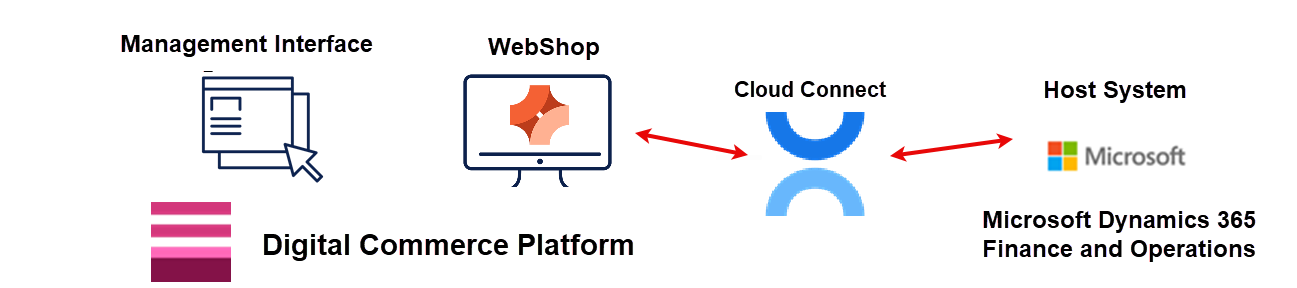
CPQ SmartPack for Digital Commerce provides a solution to this business case. Once purchased and installed, it enables your customers to launch Experlogix CPQ Web Configurator to configure quotations and to view, modify, and submit quotes to your Host System from within WebShop. Once a quote has been submitted, it becomes read-only on the WebShop Account Dashboard, and any status changes you make to the quote status are displayed there. This keeps your customers informed about the progress of their quote.
Managing the lifestyle stages of a quote
CPQ SmartPack for Digital Commerce supports the lifecycle stages of a quote, regardless of its complexity.
Each quote’s lifecycle is managed using two key statuses: Portal Status and Host Status. The values in these fields in your ERP are never visible to your customers in WebShop. Instead, they are mapped to customer-facing statuses, which you define in a JSON mapping found in the app’s settings.
The Portal Status is a custom field in your Host System. It controls what actions your customers can take on a CPQ quote. It has one of two statuses:
-
Draft in Progress, indicating the customer can edit the quote in WebShop,
-
Submitted in review, indicating the customer has submitted the quote. The Portal Status has been updated to Submitted, and the quote has been converted to read-only in WebShop.
The Host Status is a standard status field in your Host System. It contains a value for each stage of the quote lifecycle, based on your business processes.
More information - JSON mapping
The standard JSON mapping is
{
	"modified": "In Review",
	"revised": "In Review",
	"approved": "In Review",
	"submitted": "In Review",
	"sent": "Quote Issued",
	"confirmed": "Confirmed",
	"lost": "Cancelled",
	"cancelled": "Cancelled"
}
The JSON mapping has the following format: {“ERP status”: “Visible status in CPQ Quotes listing screen in WebShop”}.
The values on the right are those that are listed in the Portal Status drop-down box on the CPQ Quotes listing screen, as shown:
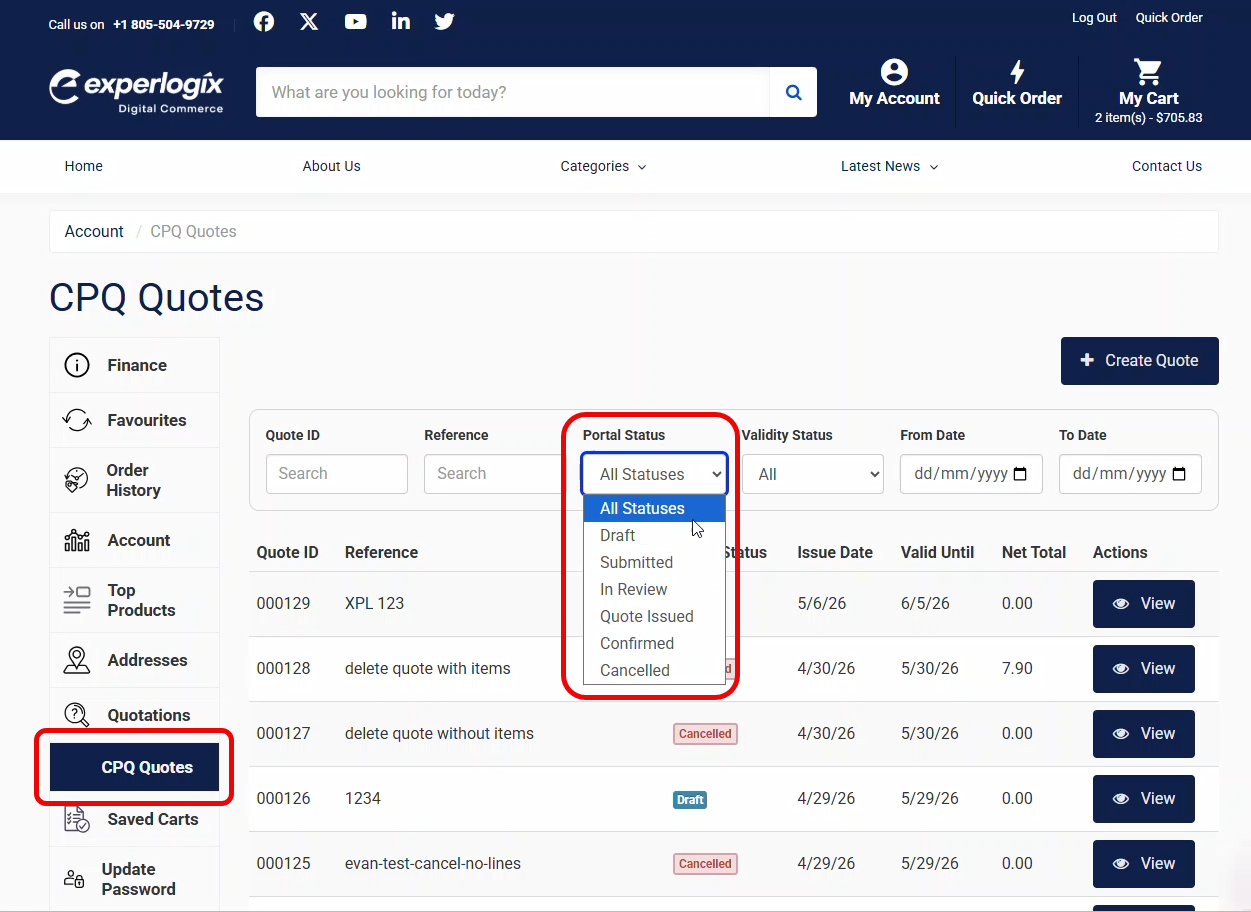
Once the quote is complete to your customer’s satisfaction, they submit it. The quote is then view-only on the CPQ Quotes listing screen, and any status changes you make are displayed there.
Data transfer
Data is transferred between CPQ SmartPack for Digital Commerce and the Host System using Cloud Connect. Different data elements are transferred depending on the quote’s location in the workflow.
Four key data transfer points are included below:
More information
Set up
CPQ SmartPack for Digital Commerce is a Premium add-on. Contact Sales for more information on purchasing it.
Open App Store in the Management Interface and locate the CPQ SmartPack for Digital Commerce. Install the app, and then configure it. Read How do I configure and manage CPQ SmartPack for Digital Commerce? for a step-by-step guide.
Use
Your customers have an additional menu option, called CPQ Quotes, visible in their WebShop Account Dashboard. Once selected, the CPQ Quotes listing screen is displayed with all the functionality required to create a quote, configure it using Experlogix CPQ Web Configurator, and manage the quote. Read How to create and manage a CPQ quote? for a step-by-step guide.
Related content
-
Standard product features: CPQ SmartPack for Digital Commerce
-
How do I configure and manage CPQ SmartPack for Digital Commerce?