
Layout
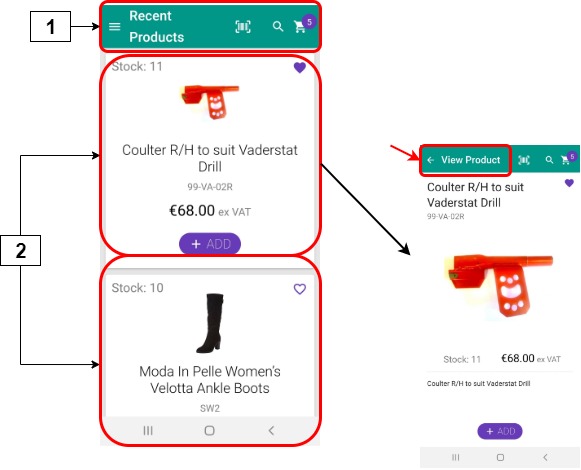
Selecting Recent Products displays a list of recent products from your most recent orders. Recent sales data is extracted from your ERP, and a list of recent products is created. The associated product details are displayed for each recently ordered product. This information can not be edited within PocketShop.
|
|
User interface element |
Name |
Description |
|---|---|---|---|
|
1 |
Top bar |
Recent products |
Contains the set of options available on all PocketShop screens. |
|
2 |
Card |
Product details |
Contains product details, including the product code, up to four images, a description, and the price. Select the product card to change it to full-screen mode. Select View Product, indicated by the red arrow in the screenshot, to return to the smaller screen size. Select ADD to add the product to your shopping cart. |
Retrieving and storing data
Key points
-
Data is retrieved from your ERP when you log in initially. The data is stored locally within the PocketShop application.
-
Data is retrieved each time you open the Recent Products screen.
-
Data retrieved is based on all recent products purchased across all Digital Commerce products, including PocketShop, WebShop and SalesRep.
Intact iQ
|
PocketShop field name |
User interface Tab or Box | Field |
Database table.field |
|---|---|---|
|
Product code (SKU) |
Stock | Product | Product List |
T_PRODUCT | C_CODE |
|
Product images |
Stock | Image box (on bottom right of screen) |
ECommerceSettings | ExtendedDescription |
|
Product description |
Stock | Description |
T_PRODUCT | C_DESCRIPTION |
|
Pack size |
Stock | Product | Product List |
T_PRODUCTPACKDEFINITION | C_UNITSPERPACK |
|
Price |
Stock | Product | Product List | SellingPrice1 |
T_PRODUCT |
|
Stock number |
Stock | Stock level |
T_PRODUCT_STATISTICS | C_STOCKLEVEL |