
Layout
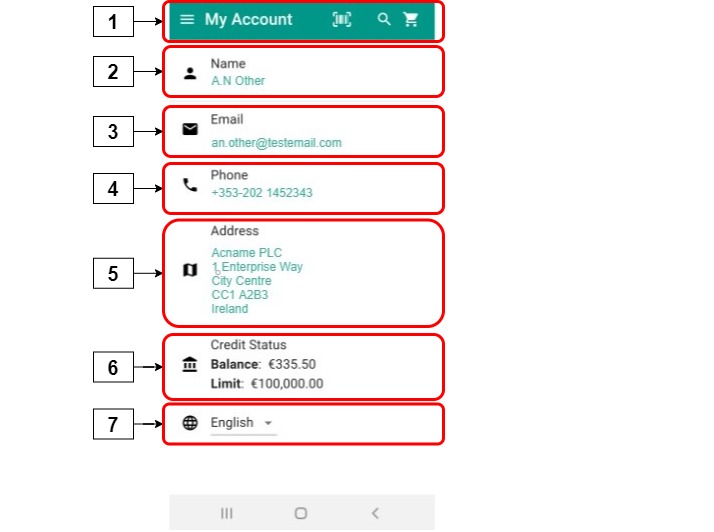
Clicking My Account displays account information. This information is extracted from your ERP, and cannot be edited within PocketShop. The following data is displayed:
|
|
User interface element |
Field name |
Description |
|---|---|---|---|
|
1 |
Top bar |
My Account |
Contains the set of options available on all PocketShop screens. |
|
2 |
Card |
Name |
Displays name, as entered in your ERP. |
|
3 |
Card |
|
Displays default email address. |
|
4 |
Card |
Phone |
Displays default phone number. |
|
5 |
Card |
Address |
Displays the customer’s default address. |
|
6 |
Card |
Credit status |
Displays your credit status; both your balance and credit limit are shown. |
|
7 |
Drop-down box |
Language |
Select the language you wish your PocketShop to be viewed in, by choosing the language from the drop-down box. |
Retrieving and storing data
Key points
-
Data is retrieved from your ERP when you initially log in. The data is stored locally within the PocketShop application.
-
If you update the customer’s data in your ERP, the data is updated in PocketShop as part of a regular import.
-
It is not possible to update customer’s My account data from within Management Interface, and for this change to be propagated to PocketShop.
Intact iQ
|
PocketShop field name |
User interface Tab or Box | Field1 |
Database table.field |
|---|---|---|
|
Name |
Customer List | Name |
Customer.Name |
|
|
Contact information | Email Address |
Customer.EmailAddress |
|
Phone |
Customer List | Phone |
Customer.Phone |
|
Address |
Customer List | Full Address |
Customer.Address - consisting of:
|
|
Credit status - credit limit |
|
Customer.CreditControlSetup.CreditLimit |
|
Credit status - balance |
Customer List | Balance |
Customer_Statistics.Balance |
1 Intact IQ set up: these tab or box names could be slightly different on your user interface because Intact IQ has a flexible design layout tool.