
Purpose
-
To define the criteria that must be met to have a product visible and available to order by your customers in WebShop.
-
To explain how to update a product status to make it visible or invisible.
Introducing terms and concepts used in this article
|
Term |
Definition |
|---|---|
|
Category |
a class that contains one or more products from your product listing. |
|
Enterprise resource planning |
(ERP), a collection of your critical business operating systems, such as product, stock levels, financial, customers, suppliers and so on that run on the same platform. |
|
Product code |
(SKU), the unique code for the product. |
More information
A product is visible if the following two criteria apply:
-
the product has a price associated with it in your ERP
-
the status of the product has been set to "Visible"
You may have also configured customized rules per customer for WebShop, SalesRep and PocketShop that prevent a product being visible.
How do I verify a product's status?
View
-
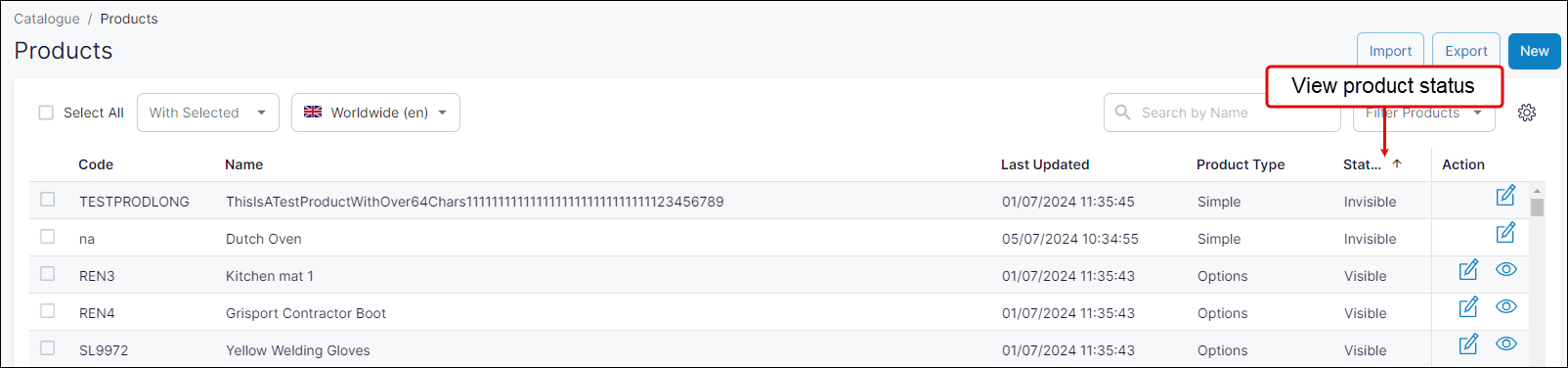
Open Product Administration in Management Interface.
-
Search for the product using their name or product code. The product's status is listed as Visible or Invisible under Status.
How do I update a single product's status?
Update
-
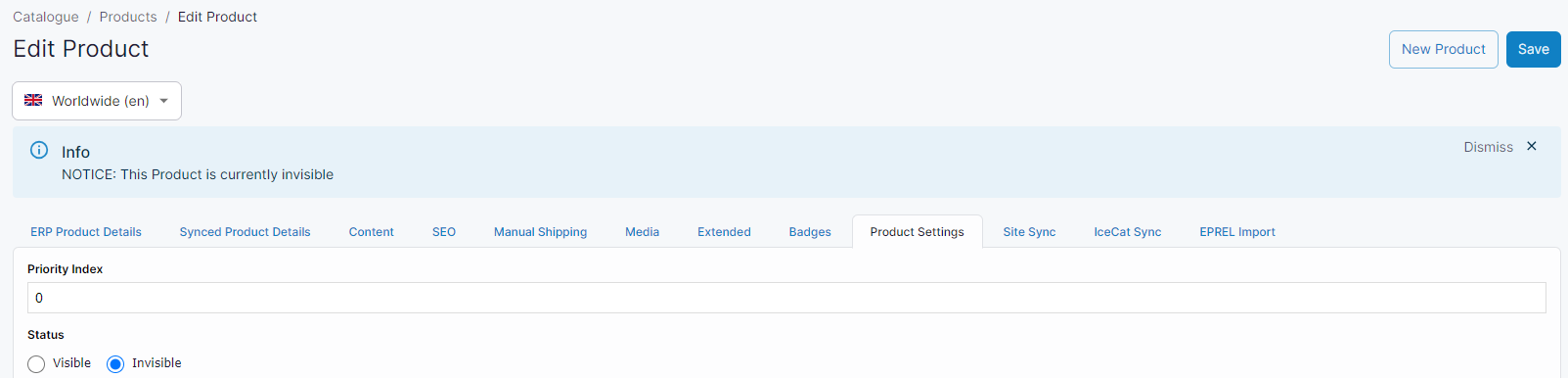
Select Edit (under Action) on the product listing page for the product you wish to update.
-
Select Product Settings tab.
-
Change Status to Visible.
-
Click Save.
Once a product’s status is Visible and there is a price associated with it in your ERP, your customers are able to order in through your WebShop.
How do I bulk update a product's status to Visible?
Update
Use our spreadsheet import tool to bulk update multiple product status. The spreadsheet template has the following fields

-
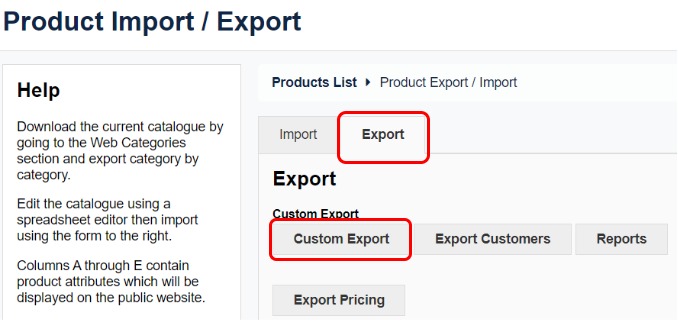
Open Import/Export in Management Interface.
-
Select the Export tab.
-
Download a spreadsheet of your existing products, using Custom Product Export.
-
Update the product's status to Visible, and save your changes.
-
Return to Import/Export to Management Interface.
-
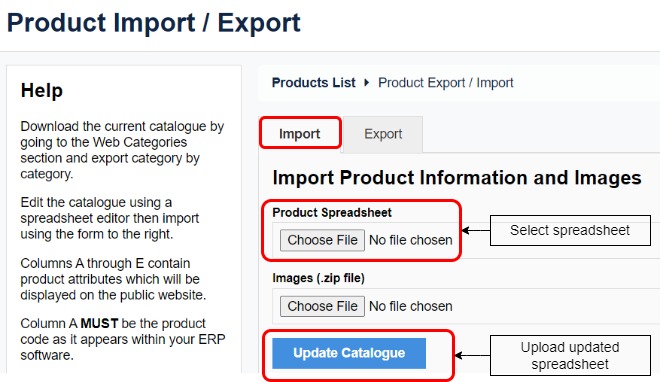
Click Choose File under Product Spreadsheet, select your updated spreadsheet and click Open.
-
Click Update Catalogue. This imports the updated product spreadsheet, and updates the product status.
Troubleshooting tips
Remember:
-
The columns in the spreadsheet are in a specific order. Do not move any column to another location. Moving columns results in a failed import of your product data.
-
You can delete a column without affecting a successful import of your product data.
-
Always use the following status: "Visible" or "Invisible". Incorrect spellings, including not using a capital "V" or "I", results in a failed import.
-
Remove all white spaces from the start or end of any content that you add since white space results in a failed import. For example, the product code "12345" is processed differently to the product code "12345 " or " 12345".
-
In particular, should you accidently create a new category by failing to remove a while space (for example, "goods " instead of "goods"), a new category is created, and the product listed on the spreadsheet is moved from the old category to the newly created category. It appears that you have duplicate categories in your WebShop.
-
Check that there is a price associated with the product. Products must have a price greater than zero for them to be visible.
-
Check your product name for special characters. Only products using supported special characters are visible.
-
Check if there are products in each category. An empty category is not visible.
Key points
When using a product spreadsheet to bulk update product data, be sure that
-
the columns are in the correct order,
-
you have checked case sensitivity, misspellings and verified there are no white spaces either before or after content in each field.
Other things to check if your product or category is not visible on WebShop:
-
the product has a price associated with it.
-
the product name only uses supported special characters
-
the category has products listed in it.