
Purpose and scope
Do you want to manage how your sales order is processed in your ERP based on a specific attribute? For example, you may wish to use an attribute associated with a specific order to determine what discounts to apply or where to ship the products contained in the order.
Both these use cases, and others, can be implemented using Order Types. Available as standard, it provides a mechanism that allows your customers to select an Order Type during Checkout. The Order Type is transferred to your ERP along with the rest of the sales order, and logic is triggered based on the selected Order Type. This enables you to manage different sales order processes automatically.
The purpose of the article is to explain how to set up Order Types and what your customers see in WebShop when they are enabled.
Key points
-
It is assumed that you are a B2B customer using the most recent version of Checkout (see Checkout for more details).
-
This feature requires configuration that must be completed before it is fully enabled and visible in your WebShop. Please contact your Onboarding Consultant or our support team for further information.
Benefits
Using Order Types to manage sales order processing has the following benefits:
-
Automated sales order processing, which reduces human error,
-
Greater transparency since sales order processing is based on a set of defined rules,
-
Provides a framework to expand to other downstream business processes.
Introducing terms and concepts used in this article
|
Term |
Defintion |
|---|---|
|
Enterprise Resource System |
(ERP), a collection of your critical business operating systems, such as product, stock levels, financial, customers, suppliers and so on that run on the same platform. |
|
Order type |
an attribute associated with a sales order that is used to determine how the sales order is processed, priced, or managed. |
How it fits together
Typically, an Order Type is an attribute associated with a sales order. Each Order Type consists of a key-value pair. Your customer can select a specific Order Type when they check out their order. The selected Order Type value is included with each sales order that is placed in your ERP. Each Order Type triggers a different set of logic when it is received in the ERP.
Tasks
Enabling Order Types
Contact your Onboarding Consultant or our support team for help with setting this up.
To set up Order Types, you must have the following information:
-
key-value pair for each Order Type
-
ERP field you wish to map the Order Type value to.
What does my customer see and do when they place an order?
Once your system has been set up with your key-value order types, the appropriate ERP field has been mapped, and the feature has been fully activated, your customer can select an Order Type on the WebShop’s checkout page, as shown.
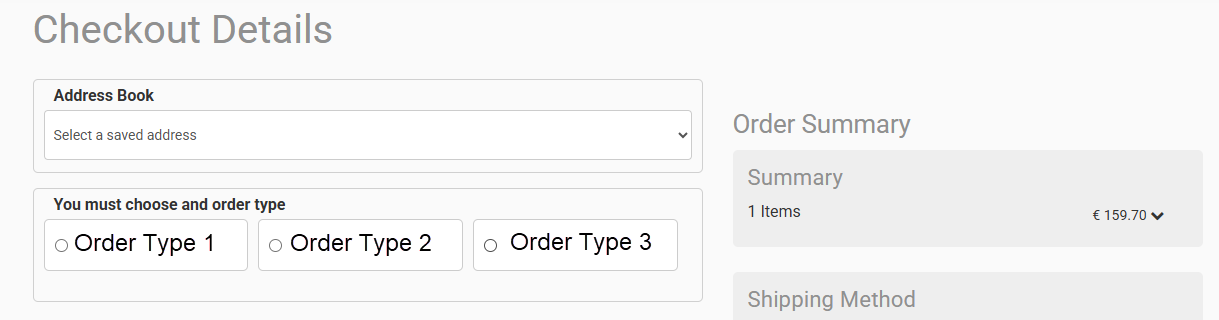
The selected Order Type is transferred, along with all other sales order details, to your ERP, where it triggers a stored procedure to process the sales order in a specific manner.